[ Healthcare Shares · Technology ]

Rebuilding a Legacy HubSpot Portal to Support Venture Capital Sales Pipelines

Healthcare Shares ran every part of its business through a single HubSpot account that had grown past the point anyone could safely change it. We went through it field by field, traced what each old field, form, segment, and workflow still fed, and rebuilt the funnels around what was left. 698 investor calls have since been booked through a two-question gate, and the team can add a business line themselves without ongoing support.

698
Investor calls booked
24
Agency clients won
99k
Contacts unified
Healthcare Shares, a physician-led venture fund backed by 250 limited partners
[ CLIENT ]
Healthcare Shares website
Healthcare Shares logo

About Healthcare Shares

Technology

Raises money for health-tech ventures from individual investors, and runs a growth agency and several other business lines through one shared HubSpot account.

Visit Healthcare Shares
[ 01 / THE CHALLENGE ]

A venture capital firm running multiple business lines on one portal

Healthcare Shares raises money from individual investors for health-tech ventures. Alongside the fund it runs a growth agency, a January investor conference, two football-club raises and several newer ventures. All of it ran through one HubSpot account. The work came to us through the agency Ladder.io.

The team had built that account up over years and it kept pace with them until it didn't. By the time we looked, there were 533 contact fields, and 294 of them fed nothing at all. Of 94 workflows, 7 were on. There were 178 lists, 26 forms, 243 marketing emails and 130 deals spread across 4 boards.

Duplication was the real problem. Investment intent lived in about ten competing fields. LinkedIn profile links lived in four, across 62,561 records. Accredited-investor status lived in four more, two of which you could only tell apart by a trailing space in the name. One field held 34 values answering three unrelated questions at once: who someone was, how they found the business, and how far they'd got.

Because the business lines shared those fields, they kept overwriting each other. One email run reached some people around twelve times. Two nurture runs went out side by side to exactly the same names. Forms replaced someone's group instead of adding to it.

And the booking link was open to anyone, so the CEO's time was going to people who were never going to invest. But that link was a symptom. The account underneath it was the job, and there was no sandbox to work in. Every change had to be made live.

[ 02 / THE BUILD ]

Read it all, trace what still mattered, then rebuild

We read before we wrote anything. The first pass copied out everything the account would let us read, with row counts and a fingerprint for each file so nothing could change unnoticed, plus screenshots of the settings that can only be seen on screen. That copy is what made everything after it safe.

Nothing was retired for looking dead. For every old field we traced what still used it: which forms wrote to it, which workflows wrote to it, which lists filtered on it. Letting one field hold more than one value meant first finding that 15 of 26 forms, 23 of 96 workflows and 15 lists all touched it, and spotting the three workflows that would wipe the other values instead of adding to them.

Here's why that mattered. One workflow looked redundant and was about to be switched off. Tracing it first showed it was the only route to a deal for 1,809 contacts on one of the football-club raises. Switching it off would have quietly stranded every one of them, so the replacement shipped in the same change. On an account with 94 workflows and nowhere safe to test, that's the difference between a tidy-up and a broken funnel nobody notices for a month.

Deciding what to keep was most of the work, and it rarely went the obvious way. 98,544 records moved onto one Contact Type field, and the old field was frozen and labelled as retired rather than deleted, because live forms still pointed at it. The four LinkedIn fields merged into one, filling only the blanks: the 1,423 records where two values genuinely disagreed were left alone and handed back as a review list, because choosing between two real links is the client's call, not ours.

Some things were kept deliberately. LinkedIn Recruiter stayed its own lead source, because it's a genuinely different product rather than a duplicate label. HubSpot's own lifecycle tracking stayed on and our version came out instead, because switching HubSpot's off affects the whole account and would have changed how other parts of the business behaved. An Enterprise upgrade was ruled out once research showed it wouldn't fix a problem about one contact belonging to several groups.

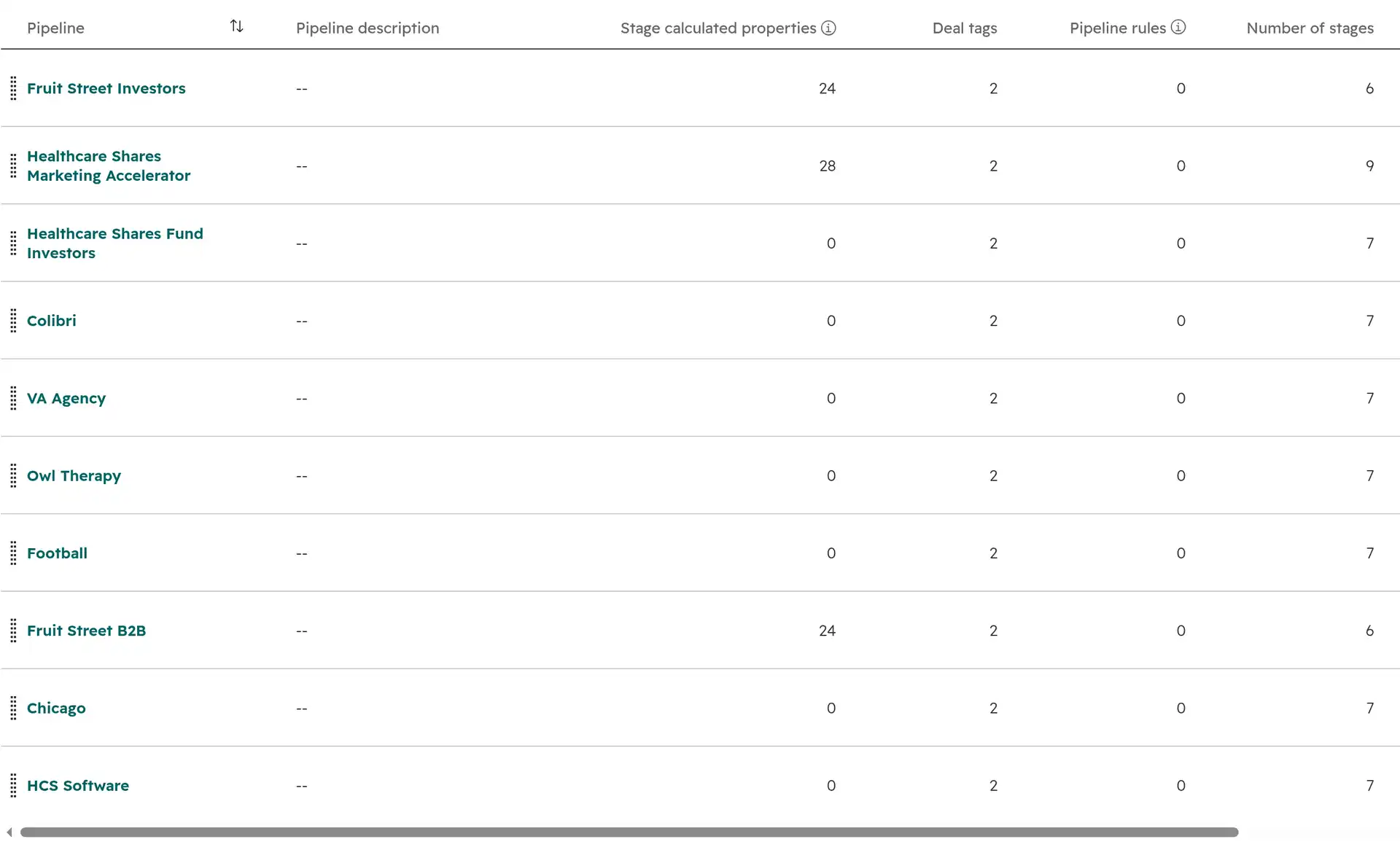
Then the rebuild. Eight deal boards, one per business line rather than one shape forced onto all of them, with six of them sharing a single seven-stage template so a new venture starts from something proven. A deal is created when a call is actually booked, not when a form is filled, so the boards only ever hold real conversations.

HubSpot deal pipeline settings showing six boards built on one stage template

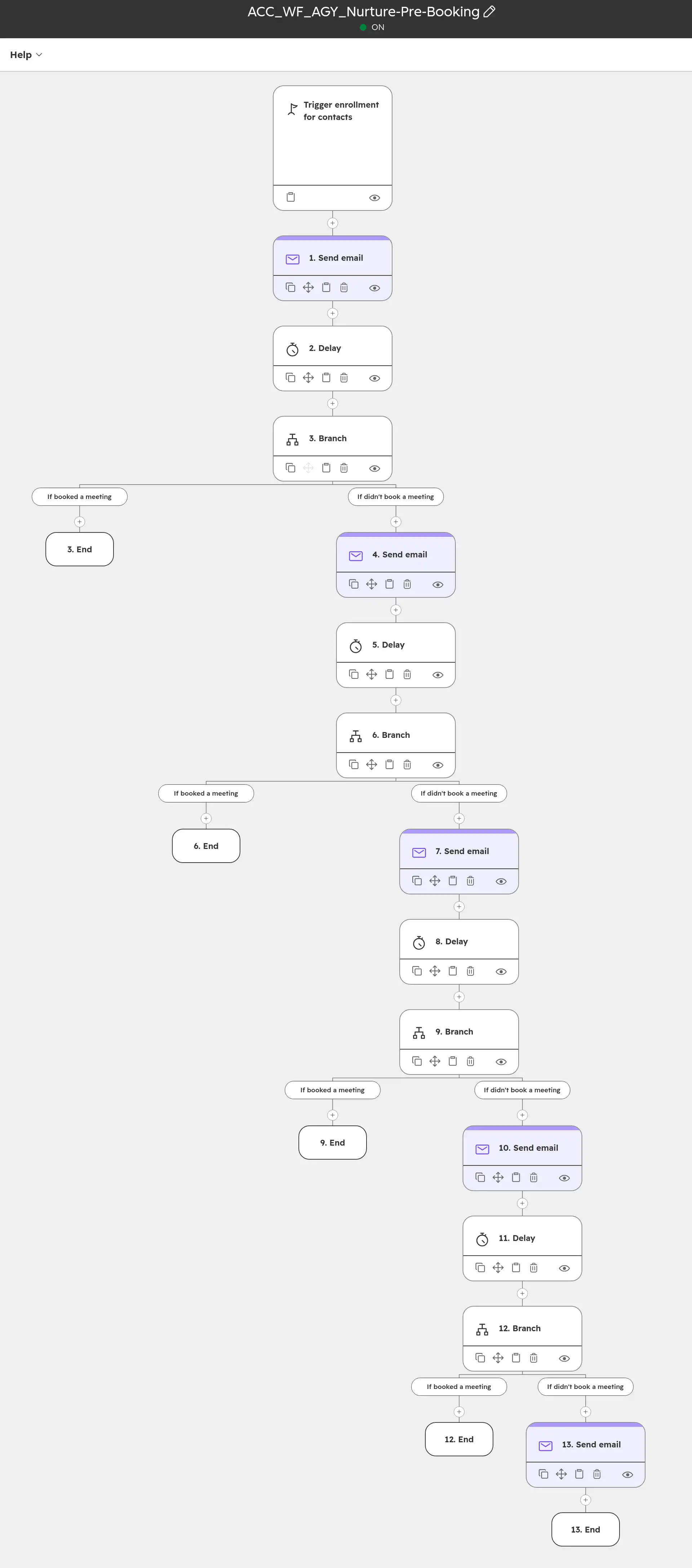
The investor funnel sits behind a two-question gate. The booking link only appears once someone confirms they're accredited and ready to invest. Four email runs sit behind it: an intro series, a slow-burn for the long tail, one that chases people who started booking and stopped, and one that chases no-shows with a fresh link. Each send checks first whether the person has already booked.

A HubSpot nurture workflow that checks for a booking before every send

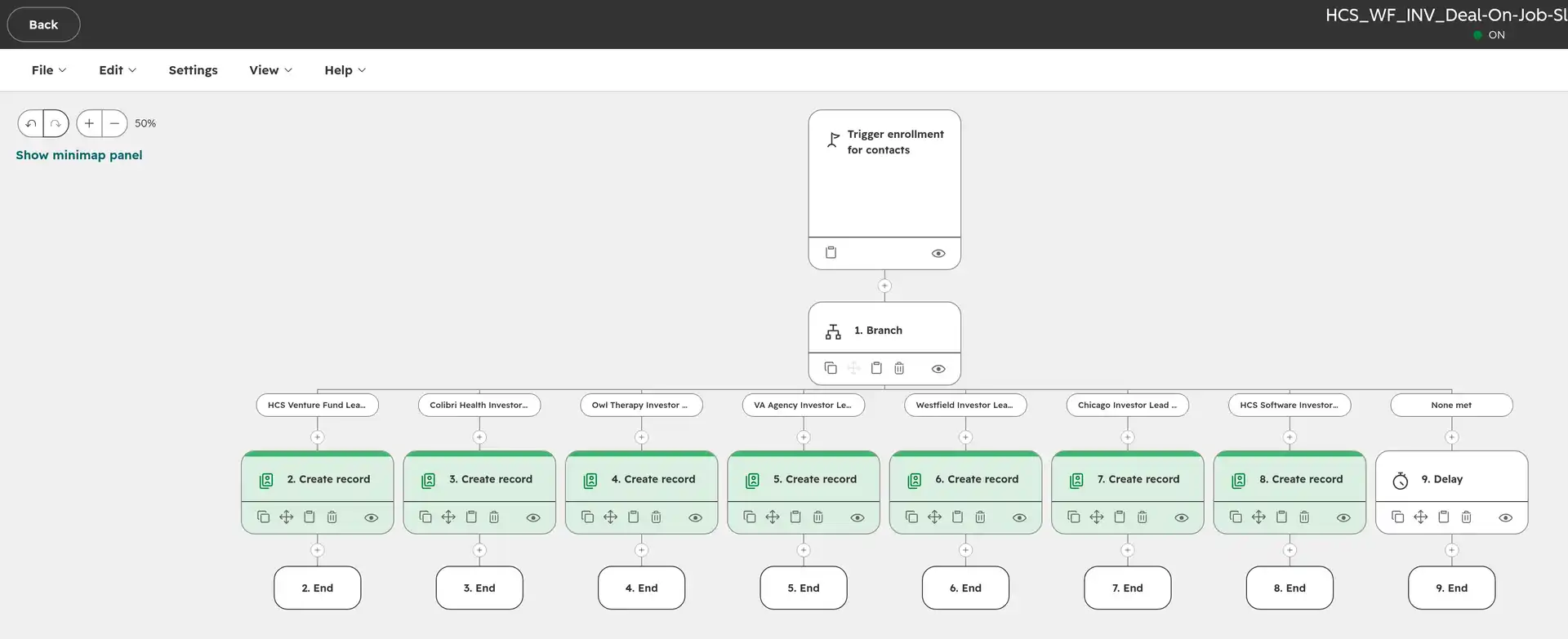
Leads from LinkedIn ads, lead forms and job slots arrive, get sorted by the campaign they came from, and land on the right board. The agency arm got the same treatment: lead scoring, a deal the moment a call is booked, automatic owner assignment, emails before and after the call, no-show chasing, reminders to revisit at 3, 6, 9 and 12 months, and two dashboards.

A HubSpot workflow branching one lead into seven business lines

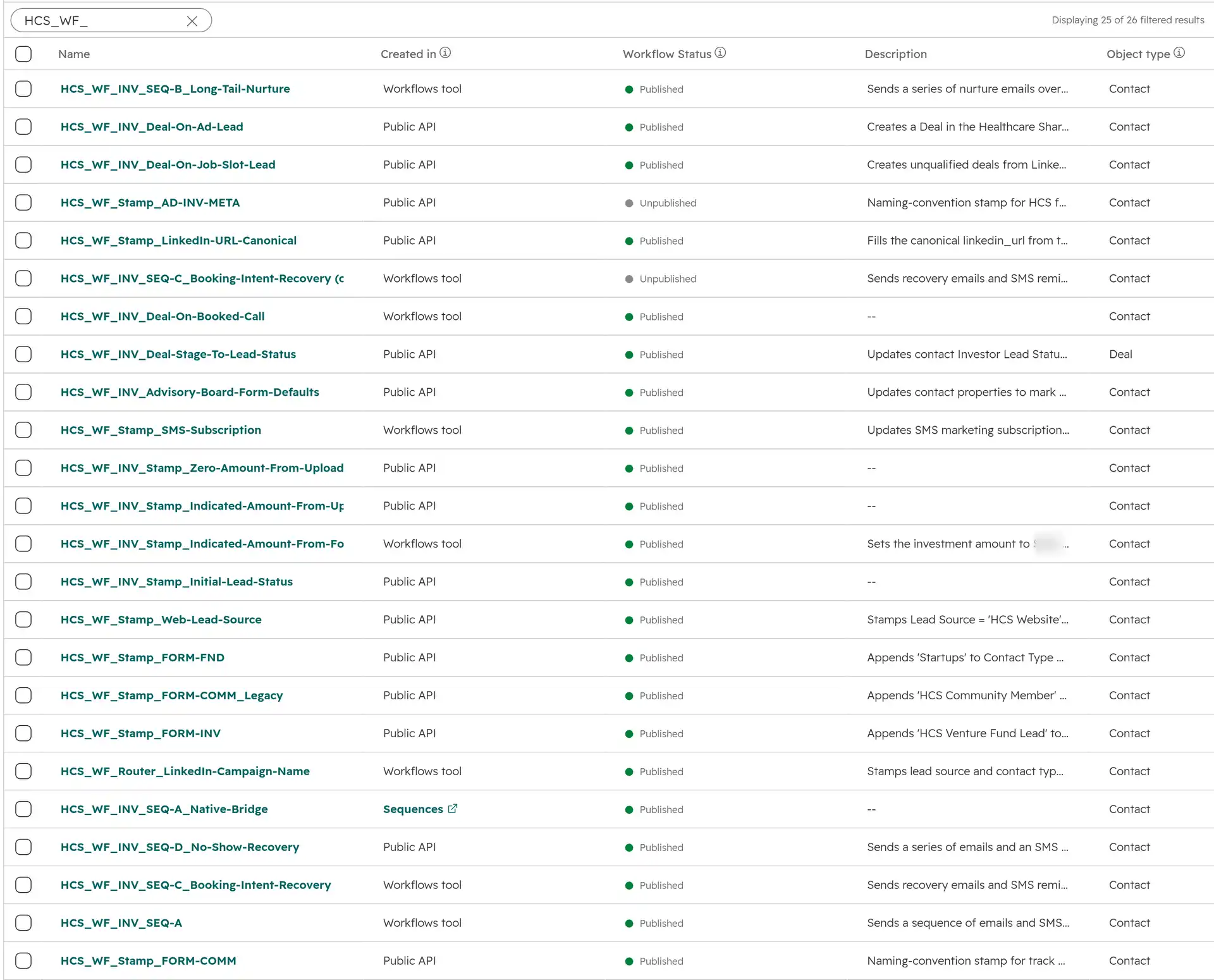
Every form and workflow name now starts with the same three parts: business line, type, track. The automation reads the name, so a correctly named form lands on the right board by itself with no workflow to edit. That's the difference between a setup the team can extend and one that needs us every time. 87 existing forms and workflows were renamed onto it, each matched by its id so none of them changed behaviour.

A filtered HubSpot workflow library where every automation follows one naming convention

Every change could be undone. 140 purpose-built Python scripts did the work, splitting roughly evenly between making changes and proving the changes were safe: a snapshot of the before state and an undo script for each merge, a small test batch before every bulk run, guards to stop an email run reaching someone twice, and every write read back afterwards to confirm it landed. That half paid for itself once, when a merge went wider than intended and the records came back in a single command instead of a week of manual repair.

  1. Audit

    A read-only copy of every field, workflow, form and board before anything changed, with row counts and a fingerprint per file.

  2. Trace

    For each old field and workflow, which forms wrote to it, which workflows wrote to it and which lists filtered on it, so nothing load-bearing was retired by mistake.

  3. Agree what stays

    Keep, merge or retire settled case by case with the team, with conflicts handed back as review lists rather than overwritten.

  4. Build

    The two-question gate, one board per business line, the email sequences behind each, and a naming rule that sorts new forms on its own.

  5. Test small, then apply

    A snapshot of the before state and a small test batch before every bulk run, then the full run, then every write read back to confirm it landed.

Tools we worked

HubSpotHubSpotLinkedInLinkedInPythonPythonClaude CodeClaude Code
[ 03 / THE OUTCOMES ]

What changed

The account went from something nobody could safely change into something that grows by following a naming rule. Adding a business line now means naming a form correctly and building its board. It no longer means working out whose workflow you're about to break.

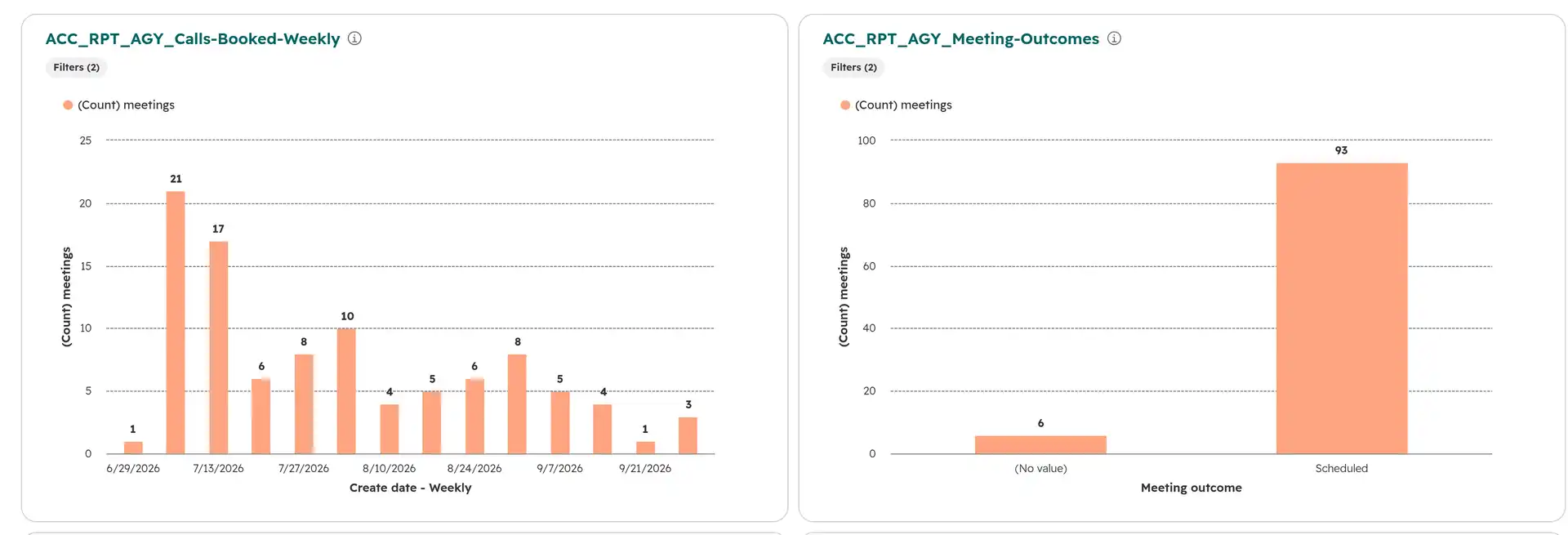
The gate changed who gets through. All 698 investor calls were booked by someone who had already confirmed they were accredited and ready to invest, so the CEO's diary holds conversations worth having. The business lines no longer overwrite each other's data, and the agency arm has its own board, its own reporting and 24 clients won through it.

A HubSpot dashboard showing meetings booked per week and how they ended

What was handed over matters most. A handbook covering 10 boards and 149 workflows, a naming guide the team follows themselves, a full list of what exists and an honest list of what's still open. The setup runs largely unattended, and when it does need changing, the team can do it without us.

698
Investor calls booked

Every one behind the two-question gate rather than an open diary.

24
Agency clients won

Closed from 338 deals on the agency board the rebuilt funnel feeds.

99k
Contacts unified

Moved onto one field that adds to a contact's groups instead of overwriting them.

294
Dead fields found

Contact fields feeding no form, workflow or list, traced and marked for retirement.

[ 04 / VOICES ]

Fabio is one of my favourite ever freelancers - he's a strategic, self-sufficient and an amazing problem-solver. Thank you for all of the support!

Alex EmbereyAlex EmbereyChief Growth Officer & Co-Founder, Healthcare Shares
[ NEXT STEP ]

Want a number like this for your business?